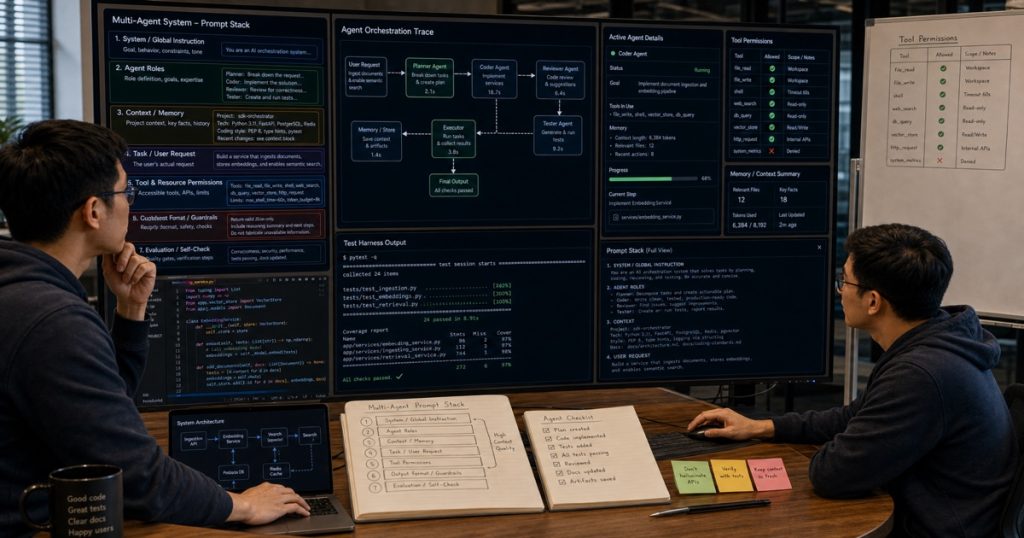
I Built a Multi-Agent System Using AI Coding Tools — Here’s the Exact Prompt Stack That Worked
Let me start with a confession: I’ve been skeptical about AI coding tools for complex architecture work. They’re great for boilerplate, sure. Unit tests? Absolutely. But building a multi-agent orchestrator with dynamic routing, state management, and fault tolerance? That felt like a stretch.
I was wrong.

Why Smart CTOs Hire Vietnamese Developers: A Data-Driven Guide to Offshore Engineering in 2025
TL;DR: Vietnam is emerging as the top destination for offshore software development in 2025. This guide breaks down… ...
Not completely wrong — there were moments I wanted to throw my laptop out the window. But after three weeks of iterating with Claude Code, Cursor, and a few local LLMs, I shipped a production-ready multi-agent system for a client in the US. And I did it with a team of five Vietnamese engineers from Ho Chi Minh City, all using the same toolchain.
Here’s exactly what worked, what didn’t, and the prompt patterns you’ll want to steal.
Outsourcing Software Development in 2025: Why Vietnam Is Beating the Competition
TL;DR: Outsourcing software in 2025 isn’t about cutting costs anymore—it’s about accessing elite technical talent. Vietnam is now… ...
The Problem We Were Solving
The client needed a document processing pipeline. Incoming PDFs, scanned invoices, and emails had to be classified, extracted, validated, and routed to different downstream systems. Each step required different reasoning capabilities.
A single LLM call wasn’t going to cut it. We needed specialized agents:
- Classifier agent — determines document type and priority
- Extractor agent — pulls structured data using schema-specific prompts
- Validator agent — checks extracted data against business rules
- Router agent — decides where the processed document goes next
The challenge? These agents needed to share state, handle failures gracefully, and not deadlock when one agent returned garbage.
Why I Rejected the “Build Everything in One Prompt” Approach
You’ll see tutorials where people cram an entire workflow into a single system prompt. Don’t do it. It’s brittle. One edge case breaks the entire chain.
I tried it. The classifier agent started hallucinating extraction fields. The router agent got confused about its own output. It was a mess.
Here’s the principle we landed on: each agent should be dumb about everything except its own job.
That means:
- The classifier doesn’t know about validation rules
- The extractor doesn’t care where data goes next
- The router only sees the validated output
This separation of concerns made the AI coding tools actually useful. Each agent’s prompt was small enough that the tools could generate reliable code for it.
The Prompt Stack That Actually Worked
I’m going to share the exact prompt engineering workflow we used. But first, a warning: don’t copy-paste these blindly. You’ll need to adapt them to your schema and business rules.
Agent 1: The Classifier
You are a document classifier. Your job is ONLY to return a JSON object with:
- document_type: one of ["invoice", "purchase_order", "receipt", "email_correspondence"]
- confidence: float between 0 and 1
- priority: one of ["high", "medium", "low"]

Rules:
- If confidence is below 0.7, set priority to "high" for manual review
- If document contains "URGENT" or "PAYMENT DUE", set priority to "high"
- Return ONLY valid JSON. No explanations. No markdown.
Simple. Focused. The AI coding tools (Cursor in this case) generated the parsing logic immediately. No back-and-forth.
Agent 2: The Extractor
This one required more context. The extractor needed to know the schema of the target database. Here’s the pattern:
You are a data extractor for [client_name]'s invoice system.
Extract fields according to this schema:
{insert_schema_json}

Rules:
- If a field is missing, set it to null. Do NOT guess.
- If the document type is "email_correspondence", only extract sender, recipient, and date.
- Return ONLY valid JSON matching the schema exactly.
We used Claude Code for this agent because it handled the schema mapping more accurately than Cursor did. The key insight: give the tool the exact schema, not a description of it.
The Orchestrator: Where It Got Interesting
The orchestrator wasn’t generated by any single prompt. This is where I had to write real code. The AI tools helped with boilerplate — the Redis connection, the retry logic, the timeout handling — but the orchestration logic itself required human reasoning.
Honestly, this is where most AI coding tool tutorials lie to you. They show you a fancy prompt and pretend the whole system builds itself. It doesn’t.
Here’s what I wrote by hand:
python
class AgentOrchestrator:
    def __init__(self, redis_client, timeout_seconds=30):
        self.redis = redis_client
        self.timeout = timeout_seconds
        self.agents = {
            "classifier": ClassifierAgent(),
            "extractor": ExtractorAgent(),
            "validator": ValidatorAgent(),
            "router": RouterAgent()
        }

    async def process_document(self, document_id: str, content: str):
        state = {"document_id": document_id, "content": content}

        # Step 1: Classify
        state["classification"] = await self.run_agent_with_timeout(
            "classifier", state
        )

        if state["classification"]["confidence"] < 0.7:
            return self.flag_for_review(state)

        # Step 2: Extract
        state["extracted_data"] = await self.run_agent_with_timeout(
            "extractor", state
        )

        # Step 3: Validate
        state["validation"] = await self.run_agent_with_timeout(
            "validator", state
        )

        if not state["validation"]["passed"]:
            return self.flag_for_review(state)

        # Step 4: Route
        return await self.run_agent_with_timeout("router", state)
Every AI coding tool I tried wanted to simplify this into a single pipeline. They'd suggest chaining agents or merging steps. But we needed observability. We needed to know *which agent failed* and *why*. A linear chain with explicit state passing gave us that.
The Failures: What the AI Tools Got Wrong
I'm not here to sell you on AI coding tools. They have real limitations. Here are the three biggest failures we hit:
1. Context Window Blindness
Claude Code would "forget" the orchestrator's state structure after 3-4 agent definitions. The generated code would reference variables that didn't exist. We had to split the system into separate files and explicitly import types.
Fix: Define all shared types in a single `types.py` file. Reference it explicitly in each prompt: "Look at types.py for the state structure."
2. Over-Optimization
Cursor once suggested replacing our Redis-based state management with an in-memory cache. For a system processing thousands of documents per hour. Without persistence. I laughed. Then I realized the tool lacked any awareness of our production requirements.
Fix: Add a system-level constraint to every prompt: "This code runs in production. It must handle 10,000+ requests per hour. Do not suggest in-memory-only solutions."
3. Hallucinated API Calls
The tools generated calls to libraries that didn't exist. `import agent_orchestrator` — seriously? That's not a real package.
Fix: We created a `known_dependencies.txt` file and included it in the context for every agent prompt. "Only use imports from known_dependencies.txt."
The Real Productivity Gain Wasn't Code Generation
Here's what surprised me. The AI coding tools didn't save us time on writing code. They saved us time on *not writing tests*.
Wait, that sounds wrong. Let me explain.
The tools generated the initial implementation fast, but the code was always 80% correct. The last 20% — edge cases, error handling, type safety — took just as long as writing from scratch.
But the unit tests? The tools were phenomenal at generating test cases. Give them the state machine transitions and they'd produce 20 test scenarios in 30 seconds. That's where the 5x efficiency claim becomes real.
I've got a team in Vietnam using this exact workflow. Our senior devs focus on architecture and orchestration. The AI tools handle the scaffolding and test generation. The junior devs learn by reviewing the generated code and fixing the 20%.
The Vietnamese Team Edge
Look, I could have built this solo. But the client needed it in 3 weeks, not 3 months. My team in Ho Chi Minh City — four developers and one QA — handled the agent implementations while I focused on the orchestrator.
We used a shared Slack channel where the AI tools' outputs got posted for review. Each dev would grab a generated agent, validate it against our `types.py`, write the missing error handling, and push to a feature branch.
The timezone overlap with US hours was minimal, but we didn't need it. The async workflow with AI-assisted code generation meant each dev could produce 3-4 agent variants per day. Without AI tools? Maybe 1, and it would have been buggier.
Would I recommend this setup to every team? No. You need senior engineers who understand multi-agent architectures first. The AI tools amplify good judgment. They don't replace it.
But if you've got that foundation? The combination of Vietnamese engineering talent and AI coding tools is ridiculously effective. You're paying $2,000-$3,000/month for developers who, with AI assistance, produce output comparable to $8,000-$10,000/month US-based engineers.
Key Takeaways
- Small prompts beat giant ones. Each agent should have a focused, single-responsibility prompt.
- Share types explicitly. Don't let the AI tools guess your data structures.
- Write the orchestrator yourself. AI tools aren't ready for complex state management.
- Use AI for test generation. That's the real 5x productivity win.
- Add production constraints to every prompt. Otherwise you'll get toy-grade code.
The multi-agent system is live now, processing about 5,000 documents daily. We've had zero orchestrator failures in production. The individual agents occasionally return garbage, but the validator catches it.
That's the whole point. Build the system so that every component is allowed to fail. The orchestrator just needs to handle it gracefully. You don't need AI tools to write that logic. But they'll sure as hell help you get there faster.
Frequently Asked Questions
Q: Should I use Claude Code or Cursor for building multi-agent systems?
Both have strengths. Claude Code handled schema-aware extraction prompts better in my tests. Cursor was faster for boilerplate and test generation. I'd use Cursor for the scaffolding and Claude Code for the prompt-heavy agent logic. But honestly, try both on a small workflow and see which one matches your codebase's patterns.
Q: How do you handle observability when AI coding tools generate the agent code?
We added a middleware layer that logs every agent's input, output, latency, and token usage. The generated agents don't know about this middleware — it wraps them at the orchestrator level. This keeps the agents clean and the observability centralized. You can instrument middleware once, and all agents benefit.
Q: What's the biggest mistake teams make when using AI tools for multi-agent architectures?
They try to make one tool generate everything. The orchestrator, the agents, the state management, the tests — all from a single prompt or session. That's how you get inconsistent variable names, conflicting type definitions, and code that works in demo but fails under load. Build it piece by piece. Validate each component before moving to the next.
Q: Can a team of junior developers use this approach effectively?
Not without strong architectural guidance. The AI tools will generate code that looks correct but fails on edge cases. Junior devs lack the intuition to spot those failures. At ECOAAI, we pair junior developers with senior engineers who review every AI-generated component. The seniors handle the hard parts. The juniors learn by doing the reviews and fixing the gaps.
Related reading: Outsourcing Software in 2025: A CTO’s Honest Guide to Costs, Risks, and Hidden Gems
Related reading: Why Smart CTOs Hire Vietnamese Developers: Cost, Quality, and Speed