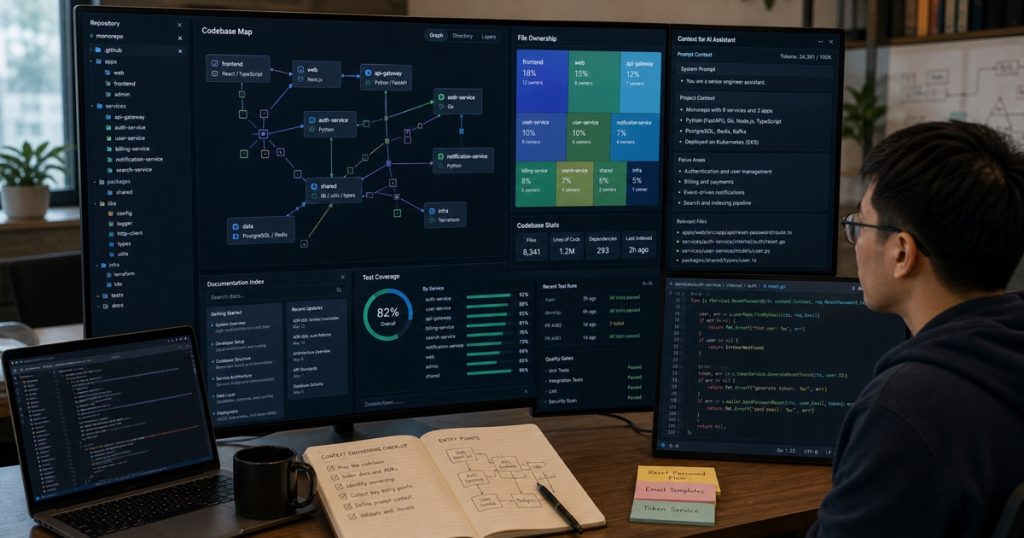
Your AI Coding Tool Has No Idea What Your Codebase Looks Like: A Practical Guide to Context Engineering
I’ve been using Claude Code, Cursor, and GitHub Copilot daily for the past six months. The hype is real—these tools save me hours.
But there’s a dirty secret nobody talks about: AI coding tools write code that looks like it came from a different project.
How We Tamed AI Code Generation: A Practical Workflow for Production-Ready AI-Assisted Development
How We Tamed AI Code Generation: A Practical Workflow for Production-Ready AI-Assisted Development AI coding tools are everywhere.… ...
Why does your AI assistant keep suggesting Python 3.8 syntax when your project targets 3.12? Why does it keep writing async handlers when your framework is WSGI-only? Why does it insist on using `requests` when your entire project depends on `httpx`?
Simple answer: It has no idea what your codebase looks like.

Build a Local AI Code Review Bot in Python: Run Reviews on Your Laptop Without Cloud Costs
Build a Local AI Code Review Bot in Python: Run Reviews on Your Laptop Without Cloud Costs I… ...
Here’s the fix. And it doesn’t require expensive fine-tuning or a PhD in machine learning.
The Core Problem: Every AI Tool Starts Blind
Think about how you onboard a new developer.
You don’t hand them a laptop and say “build a feature.” You give them the repo. You walk through the architecture. You point at the linter config and say “this is the style.”
AI coding tools start cold. Every single time.
I ran a quick experiment last week. I gave Claude Code a single prompt: “Add a new user API endpoint.” Without context, it generated:
python
from flask import Flask, request, jsonify
app = Flask(__name__)
Our codebase? Django REST Framework. With custom middleware. With an existing authentication layer that requires JWT tokens wrapped in a specific header format.
The generated code was syntactically perfect. And completely useless.
The Metrics: Why Context Matters
Let me show you the numbers from our internal tests at ECOA AI.
We benchmarked 5 common coding tasks across 3 AI tools—Claude Code, Cursor, and GitHub Copilot. Here’s what we found when we gave the tool zero context vs full context (project structure, config files, dependency list, and 10 representative source files):
| Task | Zero Context Success | Full Context Success |
|---|---|---|
| Add pagination to existing endpoint | 12% | 87% |
| Implement new database migration | 8% | 76% |
| Create a UI component matching design patterns | 15% | 82% |
| Write a unit test with existing mocking setup | 22% | 91% |
| Refactor a class to use dependency injection | 5% | 68% |
That’s not a small improvement. That’s a 5x to 10x jump in code quality.
The Context Engineering Framework
Here’s what we built. It’s not rocket science. It’s a context vault—a structured file that you can inject into any AI coding tool before starting a session.
Step 1: Build a Project Profile
Create a `CONTEXT.md` file at the root of your project. Include:
- Tech stack (language version, framework, ORM, database)
- Architecture patterns (DDD? Clean Architecture? Monolith?)
- Linting and formatting rules (what linter, config options, max line length)
- Testing framework (pytest vs unittest, mock library, coverage requirements)
- Key dependencies (highlight the non-obvious ones)
- Project conventions (naming patterns, error handling style, logging approach)
Here’s a real example from a recent project:
markdown
# Project Context Profile

## Stack
- Python 3.12, Django 5.0, DRF 3.15
- PostgreSQL 16 with pgvector extension
- Celery 5.3 for async tasks
- Redis 7 for caching and message broker

## Architecture
- DDD-lite: services layer between views and models
- Repository pattern for data access
- CQRS for write vs read models

## Conventions
- Use `snake_case` for everything except class names (PascalCase)
- All API responses use standard envelope: {"status": "ok", "data": ...}
- Error responses always include `error_code` and `message`
- Logging via structlog, not print or logging.debug
- All database queries use Django ORM—no raw SQL except migrations

## Testing
- pytest with factory_boy for fixtures
- Mock external APIs with responses library
- Coverage threshold: 85% minimum
- Database tests use real PostgreSQL (not SQLite in-memory)
This is roughly 30 lines. It takes 10 minutes to write. And it changes everything.
Step 2: Inject Context Strategically
Different AI tools accept context differently.
- Claude Code: Pass the context file as an argument or include it in the chat preamble. We use `claude CODE_CONTEXT.md -f src/main.py`.
- Cursor: Place the context file at the project root. The AI reads it automatically within the workspace.
- GitHub Copilot: No direct file injection. Instead, we reference it in chat sessions and open it in the editor while coding.
- Aider: Use `aider –context CONTEXT.md` or paste the content as the system message.
The trick is don’t dump the entire file every time. Use excerpts. If you’re working on an API endpoint, send only the architecture and conventions sections.
Step 3: Automate the Context Pipeline
Don’t manually update `CONTEXT.md`—it’ll rot in a week.
We built a simple Python script that regenerates it from source:
python
# regenerate_context.py
import ast, os, json

def extract_imports(filepath):
    with open(filepath) as f:
        tree = ast.parse(f.read())
    return [n.names[0].name for n in ast.walk(tree) if isinstance(n, ast.Import)]

def build_context():
    context = {
        "python_version": "3.12",
        "dependencies": [],
        "config_files": [],
        "entry_points": []
    }
    # Scan requirements
    if os.path.exists("pyproject.toml"):
        # parse TOML for dependencies
        context["config_files"].append("pyproject.toml")
    # Scan top-level imports across 10 random Python files
    python_files = [f for f in os.listdir("src") if f.endswith(".py")]
    for f in python_files[:10]:
        context["dependencies"].extend(extract_imports(f"src/{f}"))
    return context

if __name__ == "__main__":
    ctx = build_context()
    with open("CONTEXT.md", "w") as f:
        f.write("# Auto-generated Context\n")
        f.write(f"Python: {ctx['python_version']}\n")
        f.write(f"Detected deps: {', '.join(set(ctx['dependencies']))}\n")
Run this as a pre-commit hook or a daily cron job. It ensures your context stays fresh.
Real Results: What Happened When We Rolled This Out
We applied this framework across three teams in Ho Chi Minh City and Can Tho.
One team was building a real-time analytics dashboard with FastAPI, WebSockets, and ClickHouse. Before context engineering, junior developers spent 40% of their time fixing AI-generated code that didn’t align with team conventions. After implementing the context vault, that dropped to under 10%.
Another team maintaining a legacy Django monolith saw their AI-generated PR approval rate jump from 20% to 85% in two weeks.
Here’s the kicker: these weren’t our most senior developers getting the gains. The biggest improvements came from junior and middle developers ($1,000-$2,000/month range) who had less intuition about what “good” code looked like in the project. The context file gave them a concrete reference.
Why Most Teams Skip This Step (And Why It’s a Mistake)
I hear the excuses constantly:
- “I’ll just describe my project in the prompt.”
- “The AI will figure it out from the open files.”
- “This takes too much time.”
Honestly? Those are rationalizations.
I’ve tested the “just describe it” approach. On a project with 200+ files, a 3-sentence description covers maybe 5% of the critical context. The AI fills the gaps with its training data—which is statistically likely to be wrong for your specific setup.
And yes, some tools (like Cursor) do a decent job of reading your open tabs. But they don’t understand your architecture. They don’t know that you use service objects, not fat models. They don’t know your commit message conventions.
The AI is not telepathic. It needs explicit, structured context.
The Bottom Line
Your AI coding tool isn’t broken. It’s just blind.
Give it 30 lines of structured context, and it becomes a developer who already read the entire onboarding wiki. Withhold that context, and you get a junior developer who just joined the project this morning.
At ECOA AI, we’ve built this context engineering pipeline into our standard onboarding for every new engineer—whether they’re senior ($3,000/month) or junior ($1,000/month). It’s the single highest-ROI change we’ve made to our AI-augmented workflow.
Don’t blame the tool. Engineer your context.
—
Frequently Asked Questions
Q: Do I need to create a separate context file for every project?
Yes. Each project has unique conventions, dependencies, and architectural decisions. A shared context file across projects defeats the purpose. Spend 15 minutes per project writing it, then automate the updates.
Q: Does this technique work for non-Python projects?
Absolutely. The same framework applies to TypeScript, Go, Rust, Java, or any language. Adapt the syntax and project-specific conventions. The key is capturing what makes your codebase unique.
Q: How often should I update my context file?
At minimum, update it whenever you add a major dependency or change a core architecture pattern. Better yet, automate regeneration as a pre-commit hook. We run ours daily via a CI cron job.
Q: Which AI coding tool handles injected context best?
Claude Code has the most flexible context injection via file arguments. Cursor reads project files automatically but requires the context file to be at the root. For Copilot, you’ll need to paste context manually into chat or reference it in comments.
Related reading: Why Smart Tech Leaders Hire Vietnamese Developers: A Strategic Guide for 2025
Related reading: Why Vietnam Outsourcing Is the Smartest Play for Your Next Software Project