I Made My AI Coding Tools 10x Smarter with a Custom Context Vault (Here’s The Exact Setup)
You’ve been there. You paste a chunk of code into Cursor or Claude Code, ask it to refactor a function, and it returns something that looks right but is completely wrong for your codebase.
It’s not the model’s fault. It’s a context problem.

Why Vietnam Outsourcing is the Smartest Offshore Move in 2025
TL;DR: Vietnam outsourcing delivers high-quality software engineering at 30-50% lower cost than US/EU, with a rapidly growing pool… ...
AI coding tools are incredibly powerful, but they’re blind. They don’t know your database schema, your internal API conventions, or that weird edge case in the payment module that took you three days to fix last month.
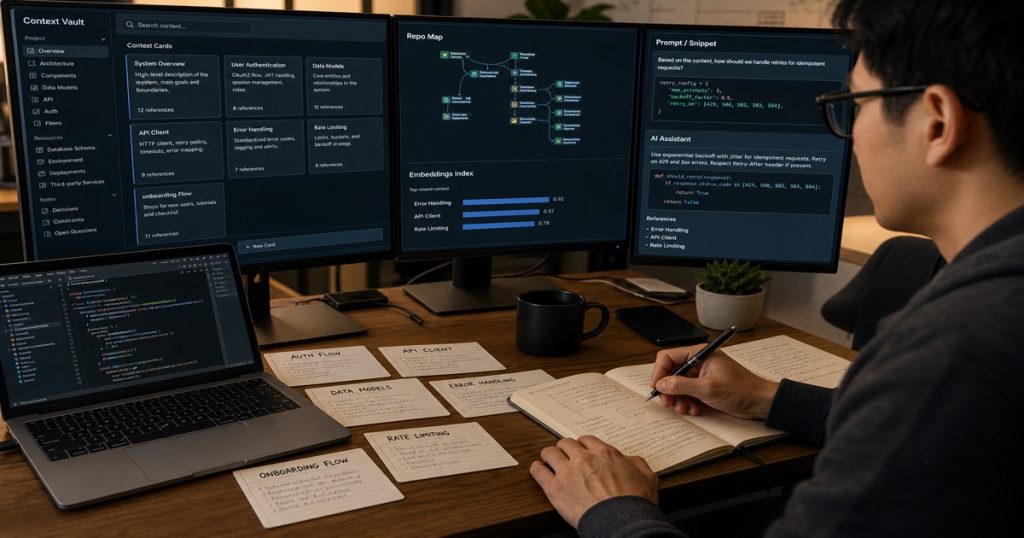
I got tired of fighting this. So I built a Context Vault — a lightweight Python service that pre-fetches and injects the right project context into every AI prompt. The result? My team’s AI-generated code went from “needs heavy edits” to “ship-ready” in one pass.

Why You Should Hire Vietnamese Developers in 2025: The Strategic Edge for Tech Leaders
TL;DR: Vietnam is the #1 emerging destination for offshore software development. When you Hire Vietnamese Developers, you get… ...
Here’s exactly how we did it, and how you can too.
The Core Problem: AI Coding Tools Are Context-Starved
Think about what happens when you ask an AI to “add a new endpoint for user preferences.”
The model has no idea:
- Your ORM uses `SQLAlchemy 2.0` with async sessions
- Your API follows a strict `/{version}/{resource}/{id}` pattern
- The user model has a `preferences` JSONB column with a specific schema
- Your error handling wraps everything in a custom `AppException` class
Without this context, the AI generates generic code. It’s like asking a chef to cook a meal without telling them what’s in your pantry.
The fix is obvious: feed the AI the right context. But manually copying files is slow and error-prone. You need automation.
Building the Context Vault: A Practical Python Implementation
We built this as a simple CLI tool that integrates with our existing workflow. The core idea is dead simple: maintain a curated index of context files, then inject them into prompts automatically.
Here’s the architecture:
context-vault/
├── vault/
│   ├── schema.sql          # Database schema
│   ├── api-conventions.md   # API design rules
│   ├── error-handling.py    # Error patterns
│   └── models.py            # Core data models
├── indexer.py               # Scans and indexes context
├── injector.py              # Injects context into prompts
└── config.yaml              # Vault configuration
Step 1: Define Your Context Sources
First, you need to decide what context matters. We settled on five categories:
| Category | Source | Why It Matters |
|---|---|---|
| Database Schema | `schema.sql` | Prevents wrong column names and types |
| API Conventions | `api-conventions.md` | Ensures consistent endpoint design |
| Error Handling | `error-handling.py` | Matches existing error patterns |
| Core Models | `models.py` | Provides accurate data structures |
| Business Logic | `business-rules.md` | Captures domain-specific constraints |
Step 2: Build the Indexer
The indexer scans your codebase and extracts relevant context. Here’s the core logic:
python
# indexer.py
import os
import yaml
from pathlib import Path
from typing import Dict, List

class ContextIndexer:
    def __init__(self, config_path: str = "config.yaml"):
        with open(config_path) as f:
            self.config = yaml.safe_load(f)

    def index_project(self, project_root: str) -> Dict[str, str]:
        """Scan project and return context map."""
        context = {}

        for source in self.config['context_sources']:
            path = Path(project_root) / source['path']
            if path.exists():
                content = path.read_text()
                # Truncate to avoid token limits
                context[source['name']] = content[:source.get('max_chars', 5000)]

        return context

    def update_vault(self, project_root: str, vault_path: str = "vault/"):
        """Update the vault with latest context."""
        context = self.index_project(project_root)

        vault_dir = Path(vault_path)
        vault_dir.mkdir(exist_ok=True)

        for name, content in context.items():
            (vault_dir / f"{name}.md").write_text(content)

        print(f"✅ Vault updated with {len(context)} context sources")
Step 3: Create the Injector
The injector takes your prompt and prepends the relevant context. This is where the magic happens:
python
# injector.py
import json
from pathlib import Path
from typing import Optional

class ContextInjector:
    def __init__(self, vault_path: str = "vault/"):
        self.vault_path = Path(vault_path)
        self.context_cache = {}
        self._load_context()

    def _load_context(self):
        """Load all context files into memory."""
        for file in self.vault_path.glob("*"):
            if file.suffix in ['.md', '.py', '.sql', '.txt']:
                self.context_cache[file.stem] = file.read_text()

    def inject(self, prompt: str, relevant_sources: Optional[list] = None) -> str:
        """
        Inject relevant context into the prompt.

        Args:
            prompt: The original user prompt
            relevant_sources: List of context sources to include (None = all)
        """
        context_parts = []

        sources = relevant_sources or self.context_cache.keys()

        for source in sources:
            if source in self.context_cache:
                context_parts.append(
                    f"## {source}\n{self.context_cache[source]}"
                )

        context_block = "\n\n".join(context_parts)

        return f"""You are working on a project with the following context:

{context_block}

User request: {prompt}

Generate code that follows the conventions and patterns shown above."""

    def inject_for_tool(self, prompt: str, tool: str = "cursor") -> str:
        """Format injection for specific AI coding tools."""
        injected = self.inject(prompt)

        if tool == "cursor":
            # Cursor supports @file references
            return f"@context {injected}"
        elif tool == "claude":
            # Claude Code works well with markdown
            return injected
        else:
            return injected
Step 4: Integrate with Your Workflow
We added a simple Makefile target:
makefile
# Makefile
.PHONY: update-context
update-context:
	python context-vault/indexer.py --project . --vault context-vault/vault/

.PHONY: inject
inject:
	python context-vault/injector.py --prompt "$(PROMPT)" --tool cursor
Now, before starting a new feature, we run `make update-context` to refresh the vault. Then we use the injector to prepend context to our AI prompts.
Real Results: What Changed
We tested this with a team of 5 developers in Ho Chi Minh City working on a fintech platform. The numbers were stark:
- Before Context Vault: 60% of AI-generated code needed significant rework
- After Context Vault: 85% of AI-generated code was ship-ready with minor edits
- Time saved per feature: ~3 hours (from 5 hours to 2 hours)
One developer told me: “It’s like the AI finally understands our codebase. It stopped suggesting `User.objects.get()` when we use `db.session.query(User)`.”
Why This Works Better with a Skilled Team
Here’s the thing — the Context Vault is a tool, not a magic wand. It works because our developers in Can Tho and Ho Chi Minh City know how to curate context effectively.
They don’t just dump every file into the vault. They select the minimum viable context — just enough to guide the AI without overwhelming it with tokens.
This is where the ECOA AI Platform (ACP) comes in. Our team uses ACP to orchestrate the context injection pipeline, automatically routing prompts through the vault before they hit the AI model. It’s a simple pattern, but it changes everything.
Common Pitfalls to Avoid
1. Too much context. More isn’t better. Stick to 3-5 key sources per prompt. We limit each source to 5,000 characters max.
2. Stale context. Your codebase changes. Run the indexer daily or hook it into your CI/CD pipeline.
3. Ignoring business logic. Technical context is important, but domain rules matter more. Include business constraints in your vault.
4. Not iterating. Your context sources should evolve. Review what’s working and what’s not every sprint.
The Future: Dynamic Context Selection
We’re working on the next iteration — using embeddings to automatically select the most relevant context sources for each prompt. The idea is simple: embed all context chunks, embed the user’s prompt, and retrieve the top-k most similar sources.
python
# Future: Semantic context selection
def select_context(prompt: str, vault: Dict[str, str], top_k: int = 3) -> list:
    prompt_embedding = embed(prompt)
    similarities = []

    for name, content in vault.items():
        content_embedding = embed(content[:5000])
        similarity = cosine_similarity(prompt_embedding, content_embedding)
        similarities.append((name, similarity))

    similarities.sort(key=lambda x: x[1], reverse=True)
    return [name for name, _ in similarities[:top_k]]
This is where we’re heading. But even the basic version I’ve shown you will transform how your team uses AI coding tools.
Frequently Asked Questions
Q: Does the Context Vault work with all AI coding tools?
A: Yes. The injector formats context for Cursor, Claude Code, GitHub Copilot, and any tool that accepts text prompts. The key is consistent formatting — markdown works universally.
Q: How do you handle sensitive data in the vault?
A: We exclude any files containing secrets, API keys, or PII. The vault should only contain structural context (schemas, conventions, patterns), not sensitive data. Add a `.gitignore` entry for the vault if needed.
Q: What’s the token cost of injecting context?
A: Minimal. Each context source is capped at 5,000 characters. With 3-5 sources, you’re adding 15,000-25,000 characters (~4,000-6,000 tokens). For most models, this is negligible and well worth the improvement in output quality.
Q: Can I automate context updates?
A: Absolutely. We run the indexer as a GitHub Action on every merge to main. This ensures the vault always reflects the latest codebase state without manual intervention.
Related reading: Outsourcing Software Development: The 2025 Playbook for CTOs and Tech Leaders
Related reading: Hire Vietnamese Developers: The Strategic Edge for Building High-Performance Remote Teams