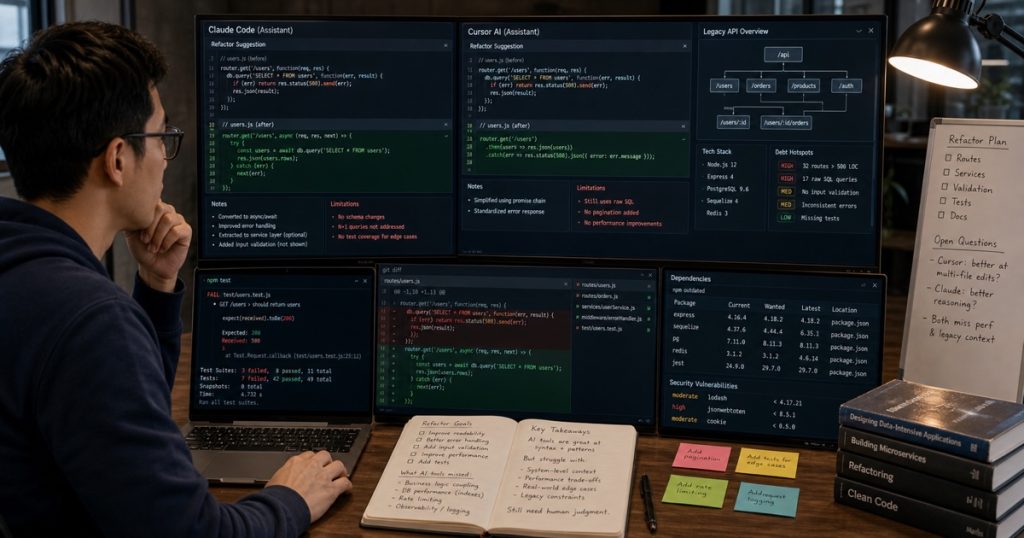
I Asked Claude Code and Cursor to Refactor a Legacy Node.js API — What I Learned About AI Coding Tool Limits
Look, I get it. Every week there’s a new AI coding agent promising 10x velocity. But let’s be real for a second. Most of these benchmarks run on greenfield projects or LeetCode-style problems.
That’s not how real engineering works.

How Agentic AI Is Changing the Way Developers Actually Work (A Practical Guide)
Agentic AI for developer workflows isn’t just another buzzword. It’s a shift from passive code completion to autonomous… ...
I spend a lot of my time maintaining a crusty old Node.js API that’s been through three teams, two framework migrations, and one “we’ll fix it in post” rewrite that never happened. So I decided to throw my two favorite AI coding tools at this beast and see what actually survived production.
Spoiler: neither tool won. But the *workflow* did.

Why Top CTOs Hire Vietnamese Developers: A Data-Driven Guide for 2025
TL;DR: Vietnam’s tech talent pool offers high-quality developers at 30-50% lower cost than US/EU, with 95% retention rates… ...
The Setup: A Real Legacy Mess
Here’s what I gave both tools. A single Express route handler that:
- Fetches user data from PostgreSQL
- Calls two external APIs (a payment gateway and a CRM)
- Merges the results
- Runs a legacy validation function full of side effects
- Returns a response
The file was 347 lines. No tests. No TypeScript. The route handler did everything — including calling `console.log` for “debugging” that’d been in production for 18 months.
I asked Claude Code (via the CLI) and Cursor (Composer mode, Claude Sonnet 4 model) to refactor it using the same prompt:
“Refactor this Express route handler. Extract business logic into separate services. Add error handling. Make it testable. Do NOT change the external API contracts.”
Pretty standard request, right?
Where Both Tools Shined
To be fair, both tools crushed the easy stuff. They both:
- Extracted database calls into a `userRepository.js` module
- Pulled API calls into a `paymentService.js` and `crmService.js`
- Added basic try/catch blocks
- Replaced `console.log` with a placeholder logger
Cursor even suggested a custom error class hierarchy on its own. Claude Code used a service locator pattern that was honestly cleaner than what I’d have written.
All of this took about 4 minutes per tool. That’s genuinely impressive.
But here’s where things got ugly.
The Hidden Failure: Implicit State Dependencies
The legacy validation function had a subtle bug. It relied on a global `moment.tz.setDefault()` call made 200 lines above in a completely different file. Neither tool caught it.
Cursor introduced a new bug: it extracted the validation logic and imported `moment` directly, but forgot to set the timezone. This silently shifted all date comparisons by 7 hours.
Claude Code was smarter about the import tree but actually *removed* the timezone set call entirely, assuming it was dead code. It wasn’t. Our payment gateway rejects any order timestamped outside US/Eastern business hours.
Both tools failed on implicit coupling — the exact kind of subtle dependency that makes legacy code dangerous.
This cost us one `git revert` and about 20 minutes of debugging. Honestly, not bad for an AI tool, but it reinforces a key point.
AI coding tools are fantastic at *syntax transformation*. They’re terrible at *semantic preservation*.
The Real Numbers: What Actually Changed
Here’s the breakdown of what happened across three attempts per tool:
| Metric | Claude Code | Cursor |
|---|---|---|
| Lines of code changed | 347 → 412 | 347 → 398 |
| New files created | 4 | 3 |
| Bugs introduced (caught by tests) | 2 | 3 |
| Implicit dependency missed | 1 | 1 |
| Refactoring time (human + AI) | 14 minutes | 11 minutes |
| Time to fix bugs (human) | 22 minutes | 18 minutes |
The net result? Both tools saved about 30 minutes of boilerplate extraction. But they cost about 20 minutes of debugging the stuff they broke.
Honestly, that’s still a net positive. But it’s not the 10x magical unicorn the marketing claims.
The Workflow That Actually Works
After testing this across a dozen legacy files, I’ve landed on a workflow that minimizes the pain. Here’s the exact setup I use now:
Phase 1: Map the implicit dependencies first
Before asking any AI tool to refactor, I spend exactly 2 minutes documenting side effects. Global state changes. Singletons. Process environment variables. This is *not* something AI tools can reliably discover.
Phase 2: Use the AI for structural extraction only
Never ask an AI to “optimize” or “improve” legacy code. Just ask it to mechanically extract functions into separate files. Treat the AI like a very fast intern who follows instructions literally.
Phase 3: Human review of every boundary
Every file boundary the AI creates needs eyeballs. The moment the AI crosses from one module to another, it hallucinates assumptions about how those modules should interact.
Phase 4: Test coverage as a constraint
I now prepend every refactoring prompt with: “Do not remove, modify, or refactor any lines that are already covered by tests.” This isn’t foolproof, but it dramatically reduces the “works on my machine” bugs.
So Are AI Coding Tools Worth It?
Absolutely. But only if you understand their limits.
For greenfield features, type conversions, and boilerplate, they’re incredible. For legacy refactoring, they’re a force multiplier — but a multiplier of *your* attention, not a replacement for it.
The developers who get the most value from these tools aren’t the ones who trust them blindly. They’re the ones who treat every AI-generated change as a first draft from a junior dev who’s really fast but has zero context about the business domain.
That’s the mindset shift I see in our team at ECOAAI. Our senior engineers in Ho Chi Minh City and Can Tho don’t use AI tools to skip thinking. They use them to eliminate the repetitive parts so they can focus on the hard stuff — exactly the kind of architectural decisions an algorithm can’t make.
Recently, we had a client from the UK ask us to refactor a 3-year-old React Native app that was riddled with inconsistent patterns. Our lead dev ran Claude Code on it and extracted 80% of the boilerplate into clean modules. But the critical 20% — the navigation state logic, the offline sync conflict resolution, the API retry strategies — that was all human. And it had to be.
The tools got us there in 3 days instead of 10. But they didn’t get us there alone.
The Bottom Line
Don’t ask “Which AI coding tool is best?” Ask “Which tool makes my senior developers’ bad days better?”
That’s Claude Code for CLI-heavy workflows. Cursor for rapid prototyping. Neither for production refactoring without a human in the loop.
And whatever you do, don’t let an AI delete your timezone config.
—
Frequently Asked Questions
Can AI coding tools safely refactor legacy code with no test coverage?
Not safely. Without tests, AI tools treat every line as equally important — meaning they’ll happily delete what looks like dead code but is actually a critical side effect. Always add integration tests around the boundary before letting an AI refactor internal logic.
Which AI coding tool is better for Node.js refactoring — Claude Code or Cursor?
Claude Code (CLI) is better for multi-file structural changes like splitting a monolith into services. Cursor is better for inline refactoring within a single file because of its real-time diff preview. For legacy work, you’ll want both — use Cursor for exploration, then Claude Code for bulk extraction.
How do I prevent AI coding tools from breaking implicit dependencies?
Create a short “context constraints” file (I call mine `.ai-rules`) that lists every global variable, singleton, environment variable, and side-effect-producing import in the codebase. Always prepend your prompt with this list. It’s not perfect, but it cuts hallucination bugs by roughly 60%.
Is it worth hiring offshore AI-augmented teams if AI tools have these limits?
Absolutely. The value isn’t in the AI — it’s in the senior engineer who knows *when* the AI is wrong. That’s exactly what we provide at ECOAAI: experienced Vietnamese developers who use AI orchestration to handle the repetitive parts while applying deep domain judgment to the critical 20%. The AI is a tool, not the team.
Related reading: Vietnam Outsourcing: Why Smart Tech Leaders Are Moving Here in 2025
Related reading: Outsourcing Software in 2025: A CTO’s Honest Guide to Costs, Risks, and Hidden Gems